Google’s OAuth Pain: Token invalid – AuthSub token has wrong scope
by Geoff McQueen on Mar.14, 2010, under General
While I’d been meaning to play with Google’s applications – and integrating them with our own Affinity - for some time, the launch of the Marketplace pushed this experimentation up the priority list.
After spending a fair bit of time hacking on a Sunday, I’d managed to re-purpose our OAuth platform to play nicely with Google, including their need to have the scope variable passed as a part of the token request process.
Regardless, I’d gotten really really really frustrated with a persistent error. While it is now really obvious, I missed it and it cost me a few hours and a lot of frustration, so hopefully this blog will help someone else trying to solve this into the future.
After correctly getting my token and secret for a specific user – and asking for quite a few scope options – I was still getting the error Token invalid – AuthSub token has wrong scope when I was trying to access a document list via OAuth.
While this error talks about AuthSub, I’ve now discovered it is really a generic error message, and applies to any case where the scope of access doesn’t match what you’re asking for, whether it is OAuth or AuthSub. This confusing error message had me off the scent for a while as I started to wonder whether OAuth was supported as widely as I had expected, whether there was a difference between paid and free accounts, and so on…
The problem in my case is that I’d requested a scope to http://docs.google.com/feeds/, but using the example code at Google’s Documents Developer Guide I was then going on to interrogate https://docs.google.com/feeds/.
To emphasise, GOOGLE THINKS THAT HTTP IS COMPLETELY DIFFERENT TO HTTPS IN ITS NON-STANDARD ‘SCOPE’ TRACKING EXTENSION TO OAUTH.
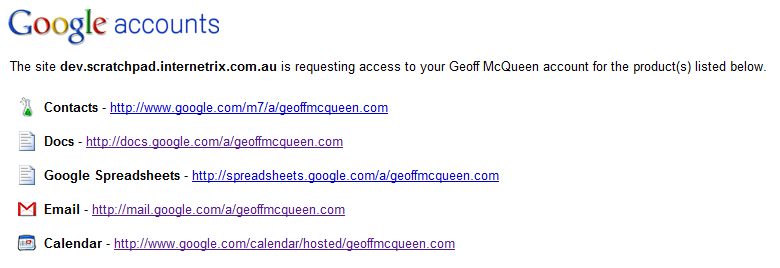
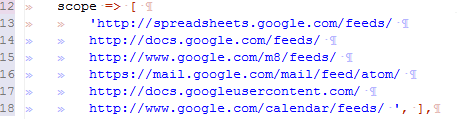
To make matters worse, even when you explicitly ask for https based feed scopes, Google doesn’t even show them to the user. Seems like in some cases, Google thinks the http vs https distinction doesn’t matter, but when it does care about it, it doesn’t give you an error message that’s any use at all.

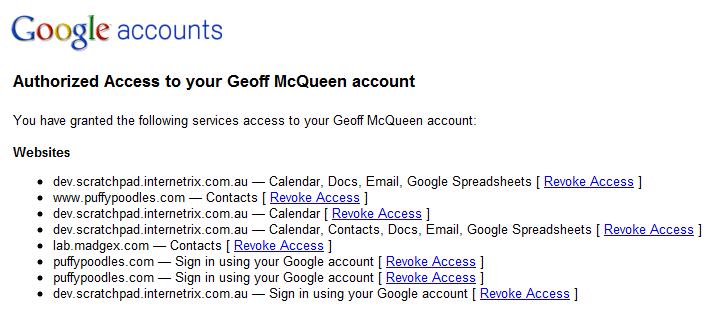
Google can't make up its mind if https and http are interchangeable in a scope: each of these scope requests were with https prefixes.
Unfortunately, Google’s own access summary interface doesn’t clarify which versions of the domains are http, and which one’s are https.
So, in summary, if you’re getting a “Token Invalid – AuthSub token has wrong scope” error when you’re trying to use OAuth (or even AuthSub for that matter?), make sure the scope you’re requesting is using the same protocol as you’re using – http vs https makes a very big difference.

24 Comments for this entry
1 Trackback or Pingback for this entry
-
"your authorization header here", what’s that? | Gravity Layouts
September 16th, 2011 on 4:08 am[...] searching again about that error leads me to a possible scope problem ( http://www.geoffmcqueen.com/2010/03/14/token-invalid-authsub-token-has-wrong-scope-oauth-google-prob... [...]


April 22nd, 2010 on 8:24 pm
arf… I almost wanted to cry when i’ve found your post… big thanks.
Whith OAuth, for almost every providers, it always fails to work for those kind of extremely subtile details
April 23rd, 2010 on 12:36 am
No worries – glad it helped!!!
May 2nd, 2010 on 4:58 pm
@Geoff McQueen
really thanks for your post.That a lot help.
May 4th, 2010 on 11:00 am
You have no idea how much I love you .. That was driving me CRAZY! Thank you thank you thank you !!
Aaron
June 12th, 2010 on 11:05 am
Geoff – You rock! Extremely frustrating issue to deal with.
July 1st, 2010 on 1:42 am
Thanks for the heads up. You saved me a ton of time. REALLY appreciate it.
September 3rd, 2010 on 7:23 pm
haha,thanks man. /kiss
September 4th, 2010 on 6:37 am
Thanks man!!
September 7th, 2010 on 7:54 pm
Another thingie I cannot fully grasp is that the URIs of some GData are different than the scope I asked for:
For example my contacts have this edit url:
http://www.google.com/m8/feeds/contacts/panosjee%40gmail.com/full/37db153890c4488
so when i try to fetch them i have the same problem as you did. Once I remove my email from the url and replace it for default it all works again
http://www.google.com/m8/feeds/contacts/default/full/37db153890c4488
September 11th, 2010 on 9:55 am
I owe you a beer. You just saved me from tossing a computer out the window I’m sure…
September 12th, 2010 on 11:30 pm
This was so lame from google, thanks a lot!
September 18th, 2010 on 2:36 pm
After having about 3-4 hours spent your post saved me from spending more. Don’t know how to thank you. (seems like I’m not the only thankful here tho =D)
November 8th, 2010 on 5:23 pm
Thanks for the hint. That one hour of my time that i cant get back. Thanks again man ^_^
November 18th, 2010 on 9:46 am
I spent almost ALL day doing this… thanks a lot Geoff!
December 2nd, 2010 on 7:05 am
Thanks a bunch mate. Damn the Google API docs http://code.google.com/apis/calendar/data/1.0/developers_guide_python.html
Just dropped the s from the scope and it works.
December 9th, 2010 on 7:22 am
Thanks a million, I still struggled with multiple scopes because while setting the FeedURI for docs I forgot to drop the s
December 10th, 2010 on 2:19 pm
It’s very incredible ! Thanks for the explanation.
December 19th, 2010 on 8:42 am
After struggling with OAuth for quite some time I finally got a way to get the token.AND THEN there was this error.
You really saved my life!!
Thank you
December 23rd, 2010 on 5:01 pm
Hey Geoff, great post. Like a lot of folks we’re glad we found your advice before spending hours scratching heads trying to diagnose this.
February 10th, 2011 on 6:06 pm
Thank you Geoff,
I had the same issue when retrieving a calendar EventEntry using the EventEntryID retrieved when the calendar EventEntry was first created.
Unfortunately, even though the EventEntry was created using an SSL connection, the returned EventEntryID had a ‘HTTP’ prefix. I simply replaced ‘HTTP’ with ‘HTTPS’ and it worked like a charm.
VB .Net snippet
‘ the stored evententryid is prefixed with http,
‘ but the authsub scope is https
‘ Google.GData.Client.GDataRequestException()
‘ 401 Token invalid – AuthSub token has wrong scope
strEventEntryID = strEventEntryID.Replace(“http”, “https”)
Respectfully yours,
Alan
June 7th, 2011 on 1:05 pm
Thanks for this post, I was having the same problem and could not figure it out.
June 19th, 2011 on 8:54 am
Just one more Thank you!
January 5th, 2012 on 2:29 pm
Thank you..!! That saved my day
January 9th, 2012 on 4:29 am
Thank you!!!